Find easy answers about HP BIOS files, product information errors, black screen, BIOS recovery failure, battery alerts, wireless module errors and boot problems.
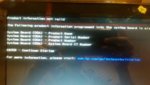
• If your HP laptop shows “Product Information Not Valid”, it usually means important system board information is missing or incorrect.
• This can include Product Name, Serial Number, Product Number or System Board CT Number. It often happens after motherboard replacement, BIOS chip programming, DMI repair, or an incomplete BIOS/DMI update.
• If your HP laptop turns on but the screen stays black, the issue can be caused by corrupted BIOS, failed BIOS update, memory problem, graphics problem, or Embedded Controller firmware problem.
• If the Caps Lock light blinks, count the long and short blinks. These blink codes can help identify whether the issue is BIOS, memory, graphics, power, CPU, EC/KBC, or system board related.
• HP BIOS update errors can show messages like “System BIOS Update Failed”, “Copy process failed”, “Unable to open BIOS Signature file”, “The BIOS recovery failed”, or “Verification of flashed BIOS image failed”.
• This can happen when the BIOS file is wrong, incomplete, not signed correctly, placed in the wrong folder, or when the BIOS region is already corrupted. In harder cases, direct BIOS chip programming with a clean dump may be required.
• “HP Endpoint Security Controller Problem” usually means the embedded security controller or related firmware data has a problem.
• This can appear after BIOS corruption, failed firmware update, motherboard replacement, or mismatch between BIOS, EC, and security-related identity data. The correct repair may require checking the BIOS dump, EC data, and board identity information.
• “HP Battery Alert 601” usually means the internal battery capacity is reduced. “Real-Time Clock Power Loss 005” usually means the system clock lost power or the RTC/CMOS battery needs attention.
• Device Manager Code 10 or Code 14 after BIOS or Windows update can also happen when firmware, system firmware driver, or BIOS configuration needs to be refreshed. Restart, BIOS update, firmware reset, or checking the correct BIOS version may be needed.
• HP laptops may show “Wireless Module Not Supported”, “WWAN Module ID 703”, or “Bluetooth Module ID 704” when an unsupported Wi-Fi, Bluetooth, or WWAN card is installed.
• This is often related to HP BIOS hardware whitelist behavior. If the wireless card is not supported by that model’s BIOS, the laptop may disable it or stop startup until the module is removed or replaced with a compatible one.
The photo above shows the “Product Information Not Valid” error that you may encounter in HP devices.
The error shows that the serial number of the device has not been entered, or entered incorrectly.
In this article, you can download the “DMI Tools” software that is used for solving this problem.
You can watch the tutorial video of using the software here.
This site uses cookies to help personalise content, tailor your experience and to keep you logged in if you register.
By continuing to use this site, you are consenting to our use of cookies.