reputation_scoree
- Device Model
- Spectre
- Serial Number
- 5cd8484kpf
Hello everyone,
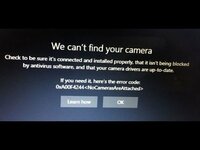
I'm having an issue with the camera on my HP Spectre x360 13-ap. It doesn't work, and I get the message "No camera attached" whenever I open the Camera app.
The camera drivers also do not appear in Device Manager. I reinstalled them from the HP website, but they still don't show up.
I've checked that the physical camera privacy switch on the side of the laptop is set to Camera On.
I even replaced the entire display assembly, including the camera module and the cables, but the issue still persists.
As a last resort, I'm considering reflashing the BIOS. Could the BIOS be the cause of this problem?
Laptop: HP Spectre x360 13-ap0008nf
Motherboard reference: DA0X36MBAE0
I'm having an issue with the camera on my HP Spectre x360 13-ap. It doesn't work, and I get the message "No camera attached" whenever I open the Camera app.
The camera drivers also do not appear in Device Manager. I reinstalled them from the HP website, but they still don't show up.
I've checked that the physical camera privacy switch on the side of the laptop is set to Camera On.
I even replaced the entire display assembly, including the camera module and the cables, but the issue still persists.
As a last resort, I'm considering reflashing the BIOS. Could the BIOS be the cause of this problem?
Laptop: HP Spectre x360 13-ap0008nf
Motherboard reference: DA0X36MBAE0